NationsGlory Sigma — Administration & Events
Administration, moderation and community management platform developed around NationsGlory Sigma.
Web platform developed around NationsGlory Sigma to centralize moderation, player management, events, Discord announcements, statistics and OMC commercial events.
Year
2025
Category
Web
Context
Personal Work
Status
Live
NationsGlory Sigma — Moderation & Administration Platform
Community web platform dedicated to moderation, administration and community management around NationsGlory Sigma.
About NationsGlory
This project is an independent community project developed around NationsGlory Sigma.
I am not affiliated with NationsGlory, its owners, or its official team. This platform is not an official NationsGlory tool and is not presented as such.
The names, trademarks and assets belonging to NationsGlory remain the property of their respective owners.
1. Overview
This project is a web platform developed to centralize various tools required for the moderation and administration of a Minecraft community around NationsGlory Sigma.
The goal is to bring together within a single interface features that would normally require several different tools: player monitoring, moderation routines, events, Discord announcements, statistics and the organization of commercial events.
The interface was designed around the needs of moderation staff and the organization of the server.
2. A platform designed for moderation
Moderation is at the core of the project.
The platform provides quick access to the information required to monitor server activity and centralizes various actions performed by team members.
The goal is to provide a clear interface allowing staff to:
- monitor moderation activity;
- view player-related information;
- record moderator routines;
- keep an activity history;
- track moderation statistics;
- access administration tools;
- organize community events;
- automate certain Discord announcements.
This centralization helps prevent information from being scattered across different tools and makes team activity easier to monitor.
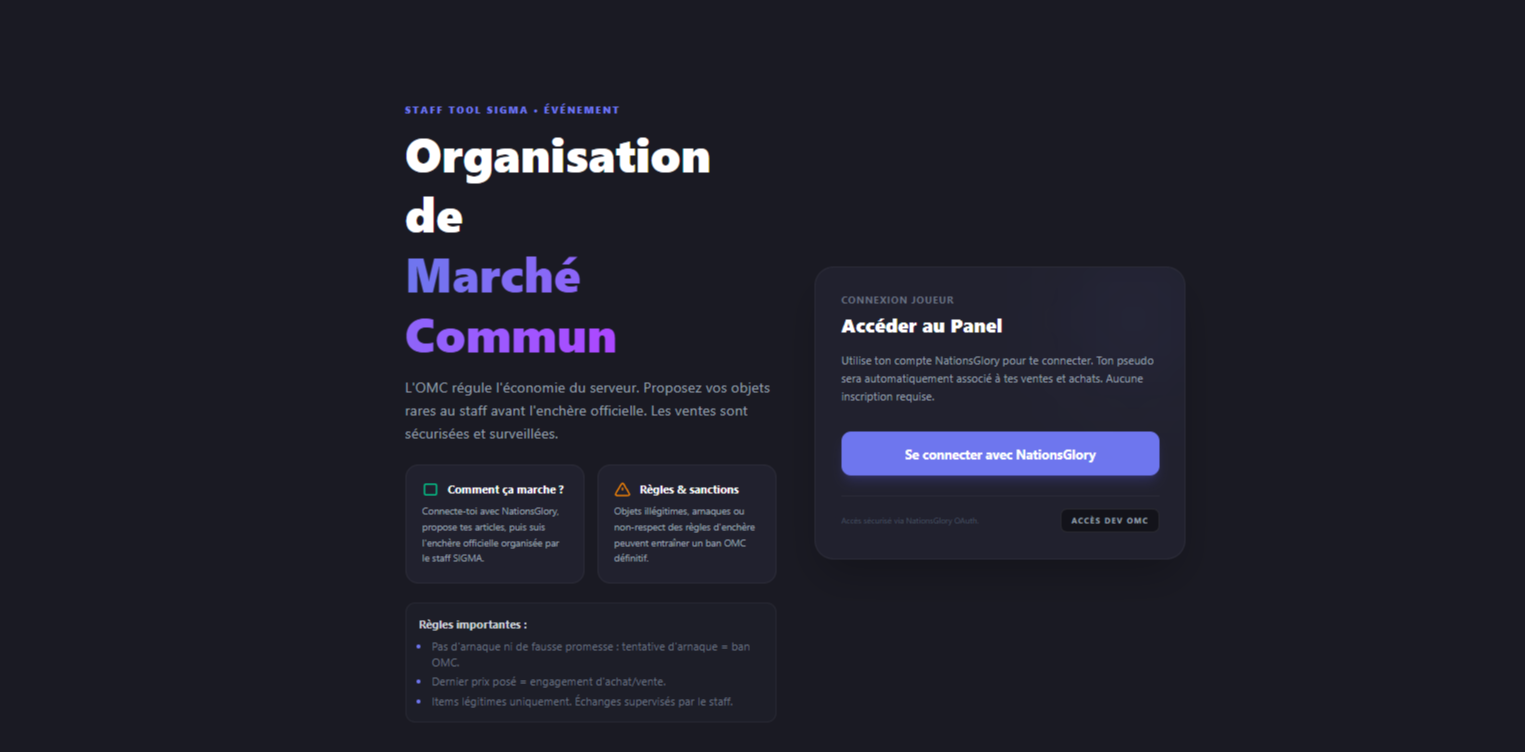
3. Authentication and player access
The platform also includes an authentication system allowing players to access their personal space.
The login screen allows users to authenticate before accessing the features available to them.

Access to the different features is adapted to the user's role, with a separation between administration tools and player-facing functionality.
4. Moderation routines
A routine system allows moderators to record their periods of activity.
Each routine can contain:
- a date;
- a start time;
- an end time;
- additional information;
- the staff member concerned.
Routines are then stored in a history, making previously recorded activities easy to review.
Moderation statistics
The platform also provides an overview of team activity.

Available statistics include:
- total number of routines;
- recent activity;
- number of contributors;
- average duration;
- total duration;
- activity record;
- monthly trends;
- role distribution.
This data makes it possible to monitor moderation activity directly from the platform.
5. Event management
The platform also includes a complete event management system.
Authorized staff members can prepare and organize events directly from the interface.

The system provides features such as:
- manual or automatic mode;
- date and time scheduling;
- reward management;
- giveaways;
- multiple mini-games;
- announcement preparation;
- a preview of the message intended for the Discord channel.
Several types of mini-games can be configured, including:
- BackRuns;
- Player Choice;
- DeaJump;
- DeathRun;
- Discp;
- Eruptia.
The interface allows staff to prepare an event while directly previewing the content that can be published in the Discord announcements channel.
6. Discord announcements
An important part of the system is the automation of announcements.
Events can be prepared in advance, with their information grouped into an interface where the content can be reviewed before publication.
The goal is to reduce manual operations and make event organization faster and more consistent.
7. Countries and nations
The platform also provides access to the different countries and nations present on the server.
A global view makes it possible to browse nations and access various information about their activity.
Each nation can then be opened in its own detailed panel.
The information can include:
- nation level;
- bank balance;
- power;
- number of claims;
- number of members;
- description;
- members;
- allies.
This feature allows staff members to quickly access important information about the different nations.
8. OMC — Controlled Market Organization
The platform also includes a dedicated module for OMC, allowing sales sessions to be organized and monitored.
Administrators have access to tools for managing different sessions and monitoring their progress.
The module makes it possible to manage sessions, listed items and their status.
9. OMC statistics
OMC sessions can be recorded in order to maintain a history and generate statistics.

The statistics provide information such as:
- number of sessions;
- total number of items;
- number of sold items;
- revenue;
- sale rate;
- revenue evolution;
- performance per session;
- most active sellers;
- most active buyers.
This provides a historical overview of the commercial activity organized through the platform.
10. OMC session presentation
A session can be launched through a dedicated presentation mode.

This interface displays the information required to launch the event, along with a countdown before the session starts.
Once the session is open, items are presented one by one.

The operator can manage each item directly from the interface.
For each sale, the system displays:
- item number;
- seller;
- item name;
- quantity;
- starting price;
- sale status.
The operator can then determine whether the item is:
- SOLD;
- UNSOLD;
- ABSENT.
Navigation between the different items is also integrated directly into the interface.
11. Player item listings
The OMC system also includes a player-facing section.

From this interface, players can submit their own items for sale.
The listing form allows players to enter:
- item name;
- quantity;
- price.
This separation allows players to manage their listings without accessing administration tools.
12. Purchase and sales history
Players also have access to a history of their different operations performed through the OMC system.

The interface allows players to view:
- completed sales;
- completed purchases;
- related items;
- transaction information.
This history provides players with a clear overview of their activity across different OMC sessions.
13. A data-driven approach
The entire platform is built around centralized data, making information easier to access.
The different modules turn actions performed by staff and players into structured and accessible information:
- moderation activity;
- routines;
- events;
- nations;
- sales;
- purchases;
- statistics;
- histories.
The interfaces are designed to present this data in a clear and usable way.
14. Conclusion
This project allowed me to design a complete platform focused on moderation, administration and community management for a Minecraft community.
The main focus was placed on centralizing information, creating interfaces adapted to different users and automating repetitive tasks.
The result is a platform bringing together several complementary systems within a single interface, ranging from moderation management to event organization, nation management and OMC operations.
Gallery